In Short
Solo product designer, end to end, 6 months. LAMAD ran five departments across Oman and Dubai on paper, Excel, and email. I designed a custom ERP from scratch: Finance, Sales, Procurement, Logistics, and Project Management. The people knew their own jobs cold; what none of them had ever seen was all of it connected in one system, with the right access controls holding it together. Building that without overwhelming first-time enterprise-software users was the actual job. The design is fully handed off, and the system is in its final phase of development before going live across both entities.
Overview
Context
LAMAD is an ISO-certified metering services company in Oman’s Oil and Gas sector, with clients like PDO. When they expanded into Dubai, they suddenly had two legal entities, two VAT structures, five departments, and no shared system connecting any of it. Sales visits lived in notebooks, procurement requirements travelled by email, and purchase orders were drafted as PDFs from scratch every time.
The brief was a system built around how they actually worked, and I was the only designer on it.
One thing shaped every screen: nobody at LAMAD had used SAP, Zoho, Odoo, or anything like them. But it’s worth being precise about what they did and didn’t know, because it decided what my job actually was. Each team understood their own work perfectly. The sales team knows how a sales pipeline behaves because they run one every day, just in notebooks. Procurement knows procurement. What none of them had seen was the whole thing joined up: five departments working off one set of facts, with access drawn so that not everyone sees everything. A junior accountant shouldn’t see the client budget an account manager works with. Procurement shouldn’t see live sales figures. Making all of that coherent, without making it heavy for people touching enterprise software for the first time, was the real problem.
Figuring out what the system actually needed to do
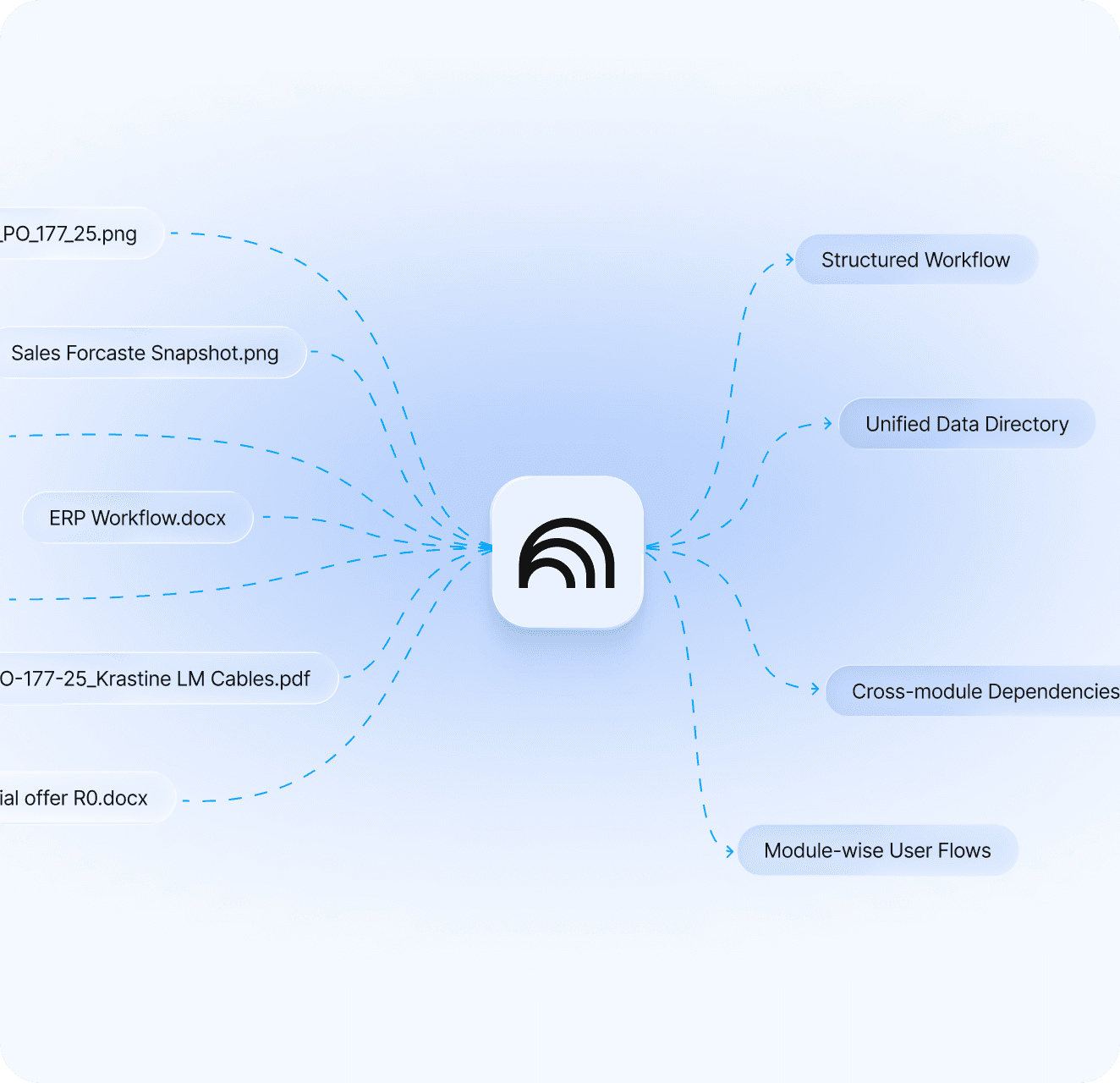
Their processes were either undocumented or scattered across email and Teams, so before designing anything I fed 50+ pages of internal documents into NotebookLM and filled the gaps with interviews of the Procurement, Logistics, and Project Management heads.
I used NotebookLM because most of those pages were internal policy, with the parts I needed buried inside:
- 1. how procurement runs,
- 2. how logistics gets scheduled,
- 3. how vendor RFQs are handled, etc.
Reading it all front to back would have cost days and left me skimming past the paragraphs that mattered, so I told it what I was after and had it pull the operational bits out.
Before
- Sales visits logged in notebooks and Excel
- Follow-ups tracked manually or sometimes forgotten
- Procurement requirements shared over email
- Logistics briefed separately by the project team
- Vendor selection based on personal judgement
- PDF POs drafted from scratch each time
- No branch separation on documents
- No shared pipeline visibility
After
- Structured visit reports inside the system
- Timestamped follow-up threads with a next action
- Module-level requirements tied to the project
- Logistics triggered directly from Procurement
- Governed by an L1 rule with mandatory approval for overrides
- A structured 3-step digital PO flow
- Every record attributed to OM or DXB from creation
- Real-time Sales Dashboard across both branches
Key Product Decisions
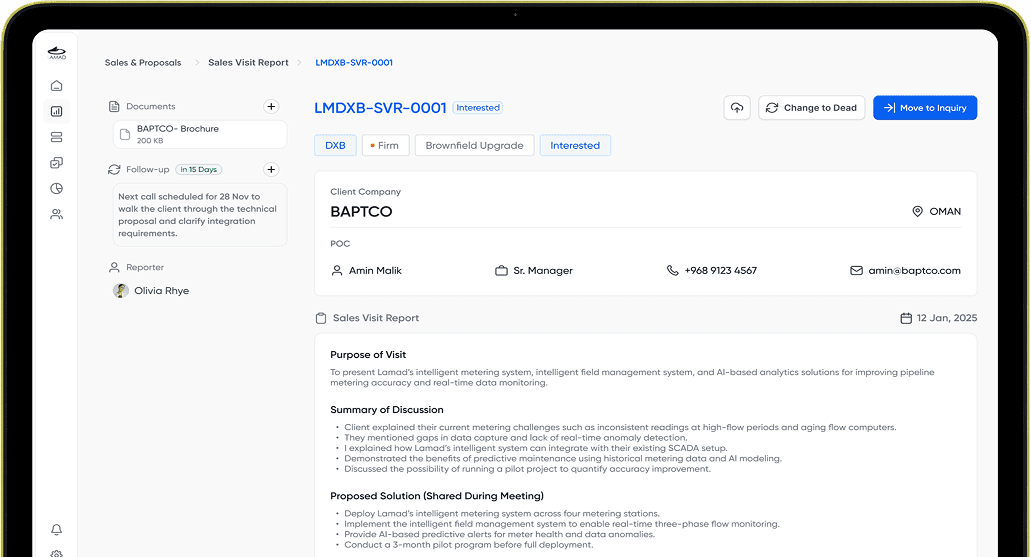
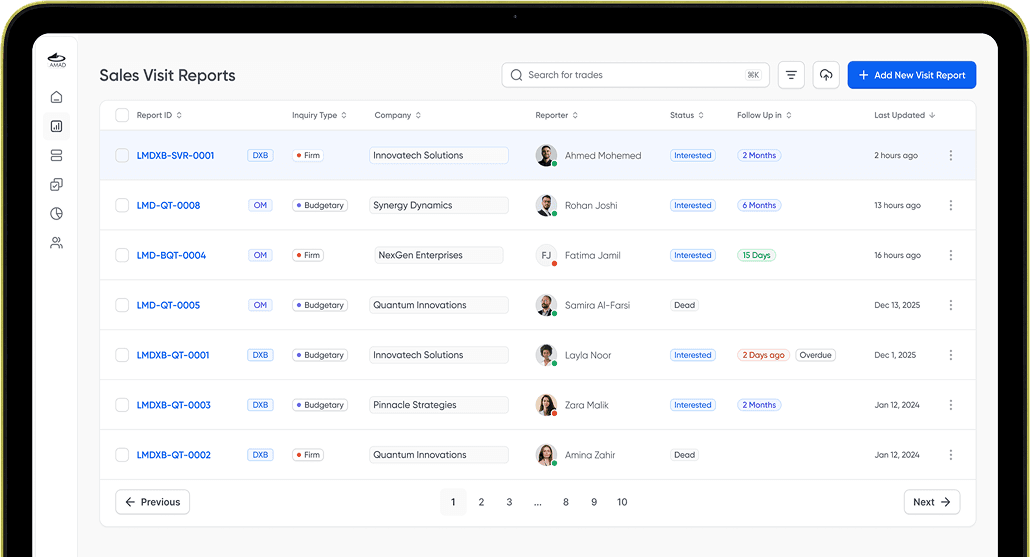
The Sales Visit Report
When a client converted, the sales team used to rewrite everything from scratch to brief the project team, because the context from the visit was spread across docs and Excel rows and notebooks that nobody could find again.
1Now every visit, follow-up, document, and next action lives in one record. Follow-up threads are timestamped and stacked with the most recent on top. When a prospect converts, the visit report moves directly into an Inquiry in the pipeline, and from there into a Project. Nobody re-enters anything by hand at any stage, and 2the manager sees all of it in real time without chasing anyone.
The PO flow
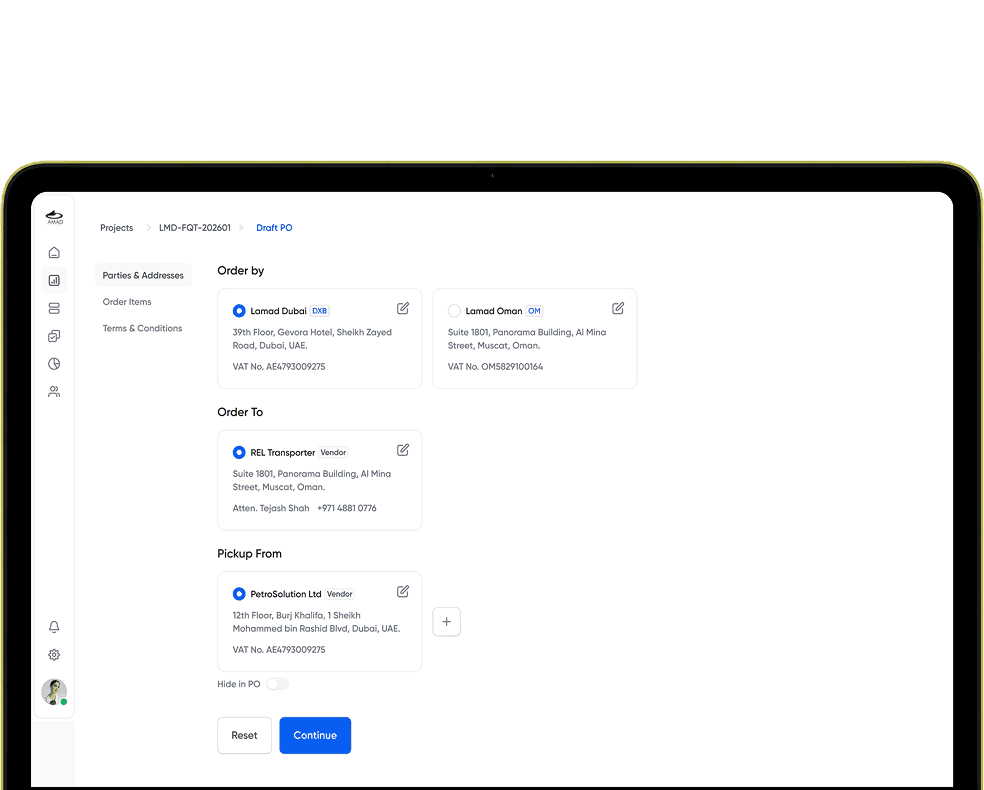
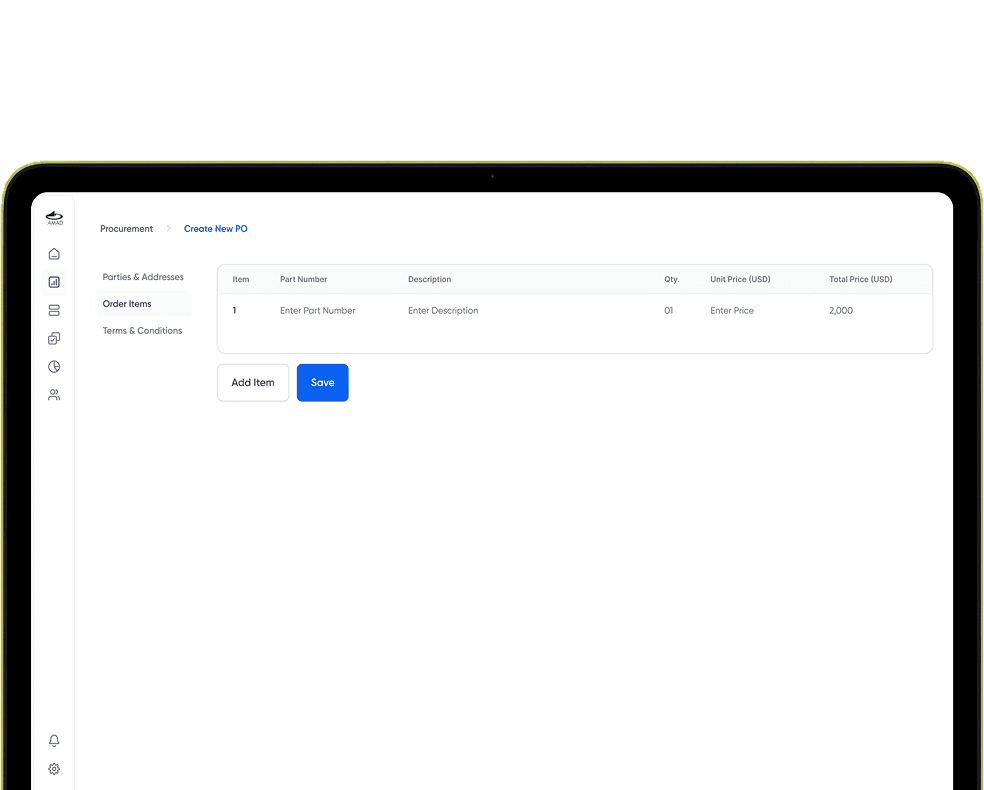
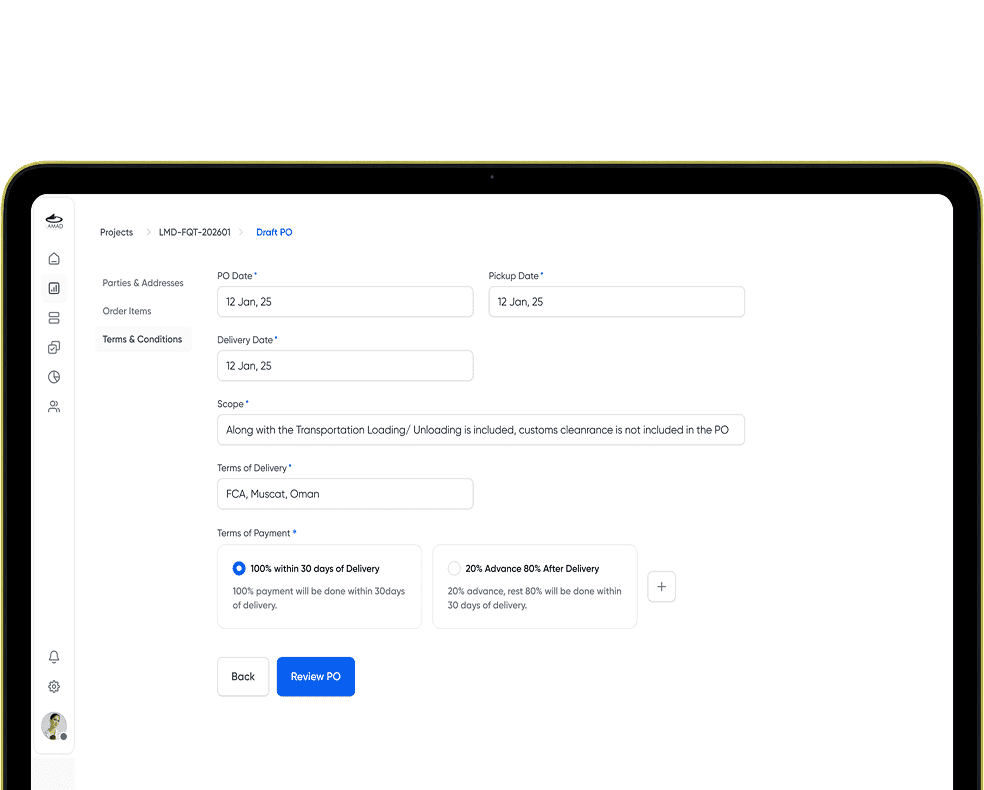
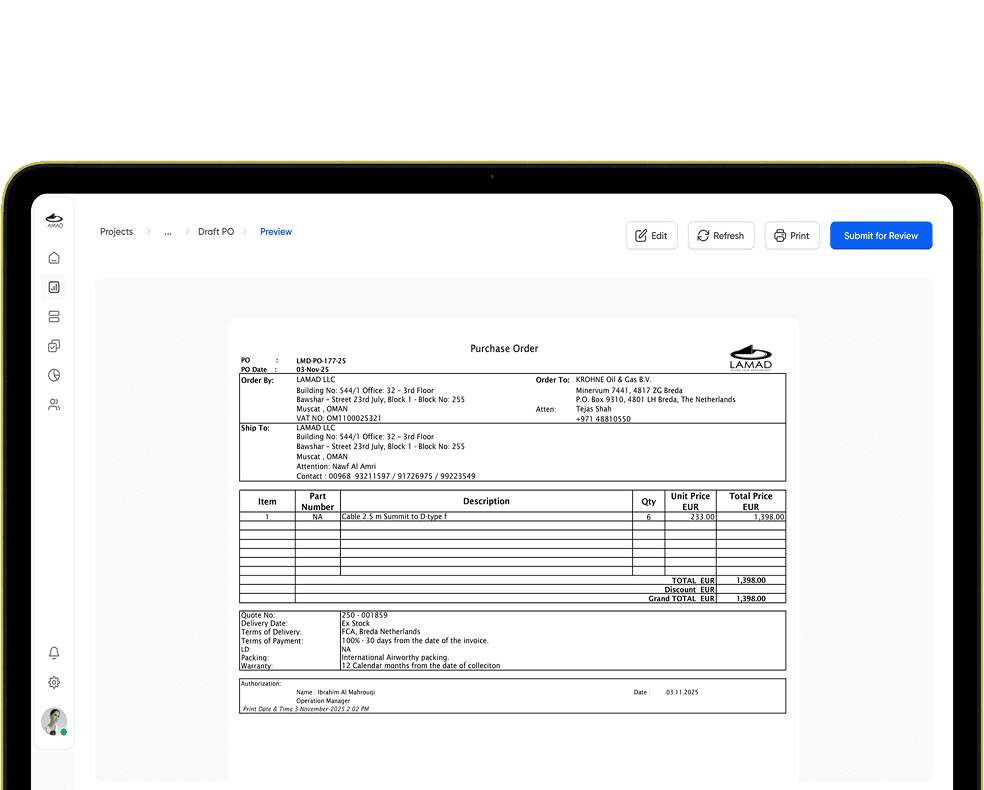
Remember, these were people coming straight from paper. Hand them one long multi-field digital form and you lose them on day one. 1So I broke PO creation into three steps, each holding one kind of decision, and each fitting in a single viewport.
21. Parties & Addresses - who ordered, who it’s ordered to, where to ship, with branch selection between OM and DXB
32. Order Items
43. Terms & Conditions
54. Draft PO Preview
While someone is entering parties, they only think about parties. When they move to items, they’re not still holding “who’s shipping where” in their head. That separation earns its keep at Order Items, because that section isn’t fixed, a PO might have one line or twenty. Twenty line items in the same form as addresses and terms is exactly where someone miscounts or misses a field. Splitting it keeps each screen focused enough that the mistake doesn’t get a chance to happen.
Vendor governance
The client’s requirement was that vendor selection follow a fair, auditable process. How to actually enforce that was left to me, and I weighed a few options.
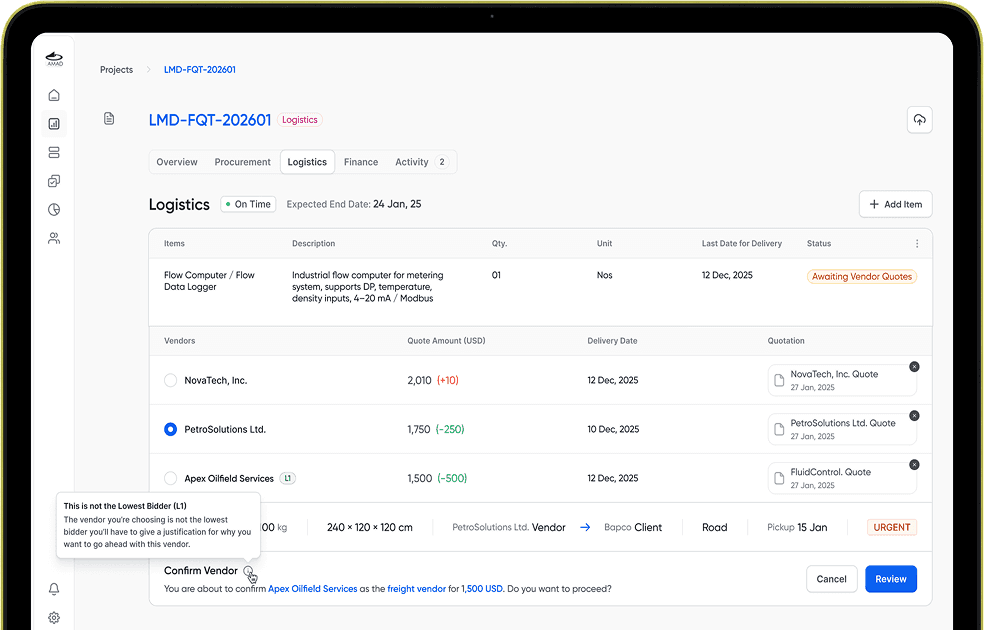
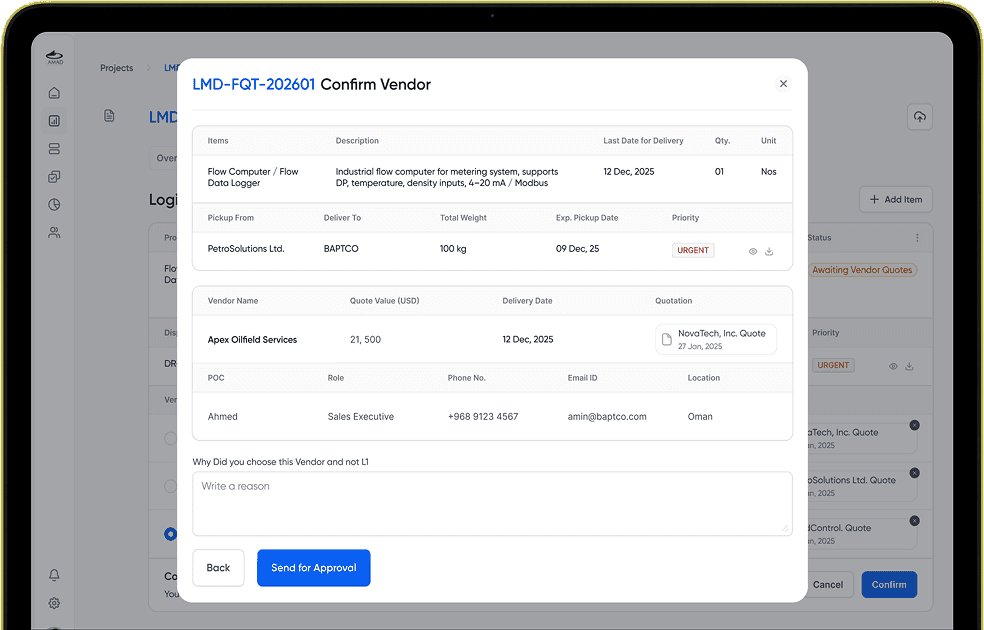
1The lightest was a warning: flag it when a procurement officer picks someone other than the L1 vendor (the lowest qualified bidder from the RFQ), and let them carry on. I dropped that quickly. A warning you can click past stops nobody who’s already decided to act on a personal bias, and the company is the one that pays for it.
So the rule I built is: 2pick a non-L1 vendor and you have to write a justification, and management has to approve the override before the PO can move. Asking for that one line of reasoning actually makes management faster, not slower. The reason is sitting right there at the point of approval, L1 quoted less, but their reviews are poor and their delivery time misses our requirement, so there’s no chain of messages trying to reconstruct why procurement went off-book. A short written reason clears most of the follow-up, and it leaves a record on every procurement decision. The policy already existed on paper; the system just stops it from being optional.
A sales pipeline the team can reshape without a developer
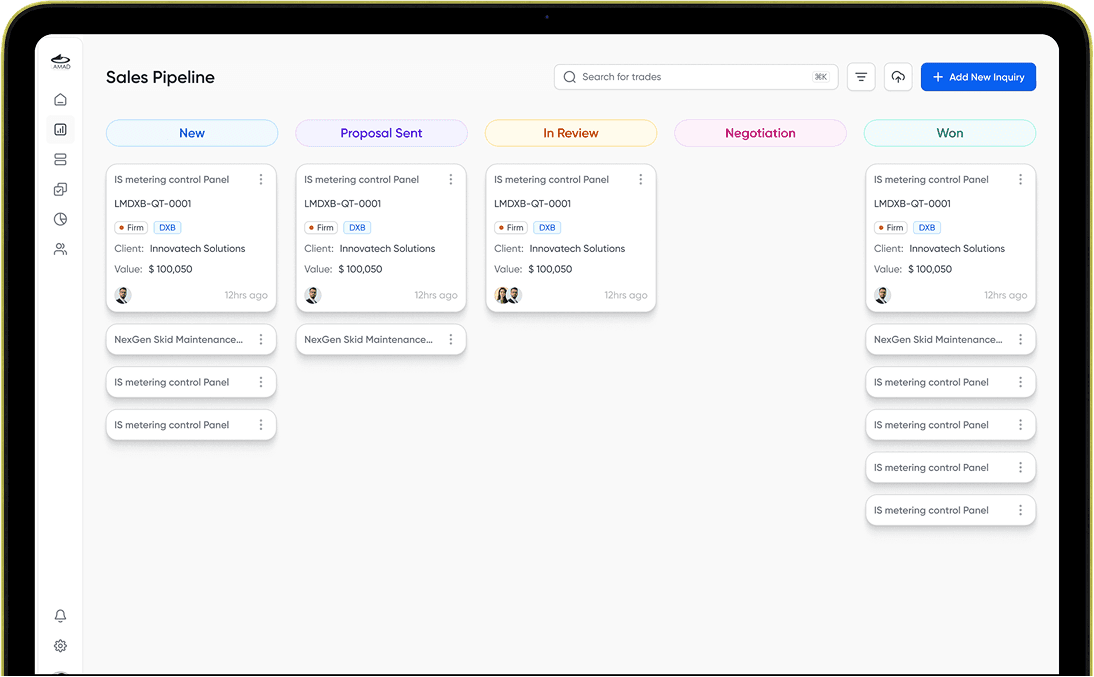
1I built the pipeline as a configurable Kanban around LAMAD’s current sales cycle, and I deliberately didn’t hard-code the stages. LAMAD is growing. Today it’s Oman and Dubai; tomorrow it could be India or Saudi Arabia, and the shape of the sales cycle will shift with each new market. Fixed stages would mean finding a developer and waiting on a rebuild every time that happens.
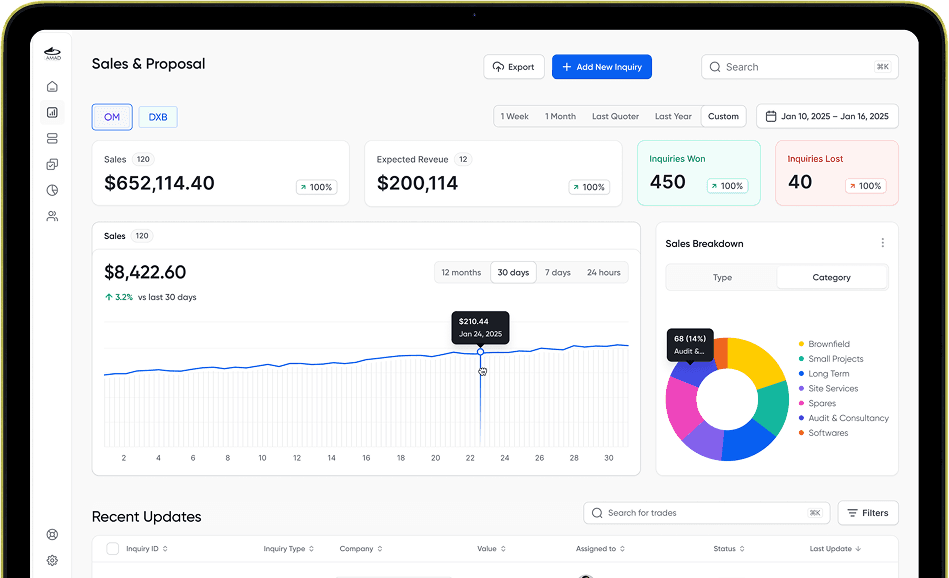
So the team owns the middle of the pipeline. The first and last stages stay put as the frame, and everything between them can be added, removed, or renamed by the team themselves whenever their process changes. 2Each card shows what a Sales Executive needs at a glance: inquiry ID, client, deal value, branch, last activity. 3The dashboard on top adds branch toggles, time filters, revenue trends, and category breakdowns, so management finally has pipeline visibility across both offices, and the company can keep expanding without coming back to design every time.
Access control that follows the org chart
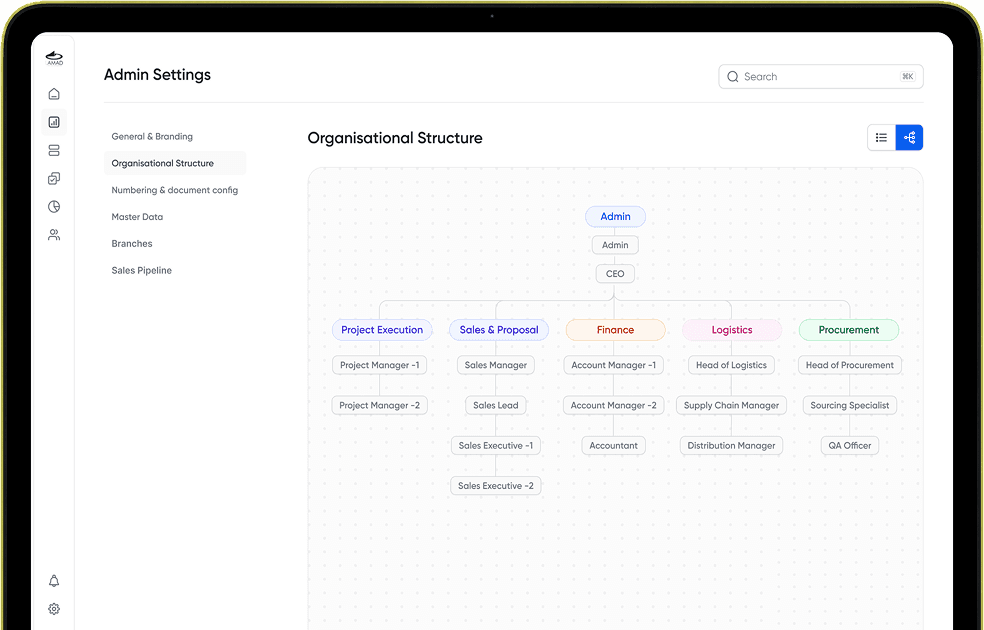
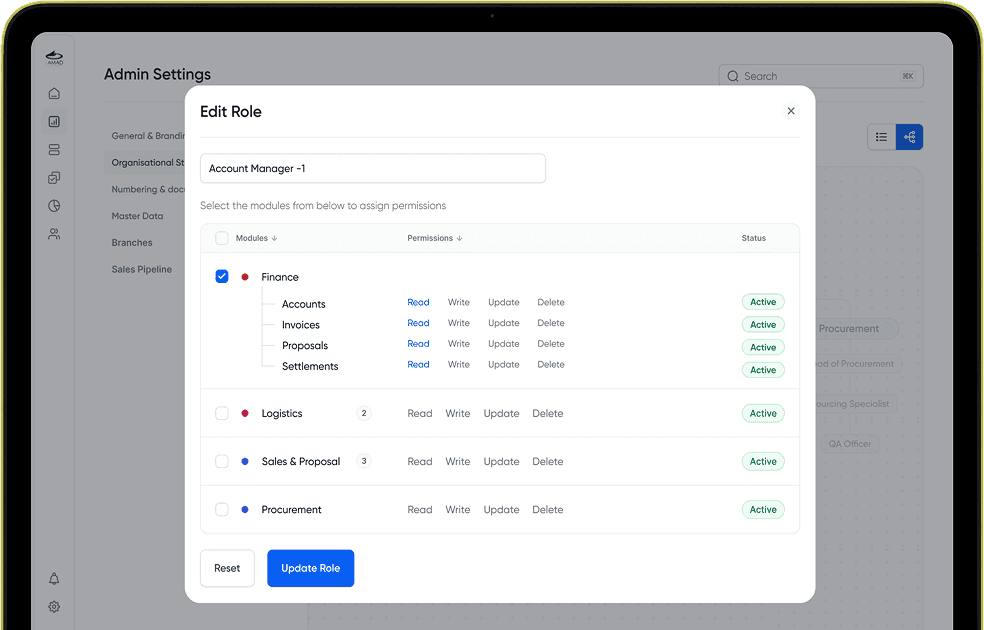
A junior Sales Executive shouldn’t see budget figures or sensitive client data. The obvious way to handle that is a per-user permissions table, 1but I tied access to the org structure instead keyed to roles rather than individuals.
You define an entity, Account Manager 1, Account Manager 2, and attach access rights to the entity, not to a named person. So Account Manager 1 and Account Manager 2 can carry completely different rights. If I want an account manager who can see data but not add or edit anything, 2I make an entity with exactly those rights and tag the person to it. Later, if someone else needs the same permissions, I attach them to the existing entity instead of building it again. Add an employee, place them in the structure, and their access comes with the seat. It holds at any team size, and it lets the client manage permissions by thinking in roles they already understand, instead of maintaining a grid of individual checkboxes.
Two legal entities, invisible to the user
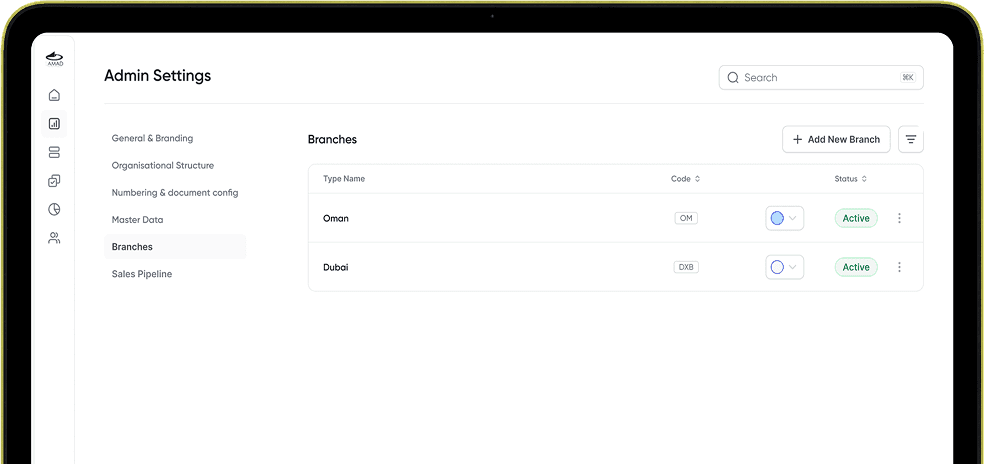
Oman and Dubai have different VAT numbers, addresses, and regulatory requirements. Branch attribution is built into the foundation of every module, so every document and transaction belongs to the correct legal entity from the moment it’s created. Users never have to think about which entity they’re operating under. The system handles it for them, and every document comes out legally correct.
The meeting where I held the line
I presented the full Information Architecture before touching a single screen. The client’s response was immediate: “We don’t understand this. Just start designing.”
I didn’t. If I jumped to screens without structural sign-off, I’d be redoing work mid-development, and since design and development were running in parallel, that would have put the whole project timeline at risk, not just my design files. So I held my ground, told them plainly that understanding this now would save real time and cost later, and got them to give me a second run at it.
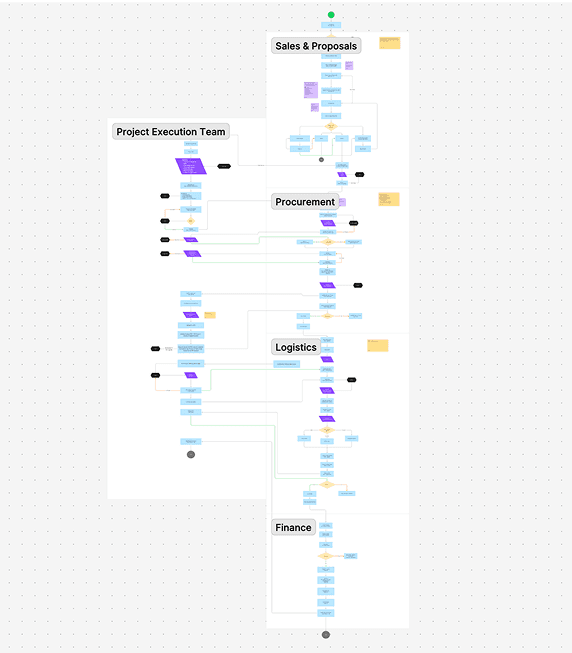
The first time, I’d basically just opened the IA and started explaining it, and they shut it down before I got anywhere. The second time I changed how I opened. I started with a plain overview of what we’d cover that day: the IA starts at Sales & Proposal, moves through Procurement and Logistics, then Finance, with Project Management running in parallel across all of it. And I walked them through it in the exact jargon from their own documents, which I’d listed alongside the IA, stage by stage in words they already used. That’s what made it land, because they were following their own process, not decoding a designer’s diagram.
That discipline held for most of the project. Then, midway through, a stakeholder who hadn’t been in the IA meeting flagged that the Logistics flow was wrong. He was right, and it wasn’t a small miss.
Validation
There was no budget or access for formal usability testing, and the users didn’t really exist yet, they were transitioning to the system as it was built. What I had instead was HOD walkthroughs of every flow in their own vocabulary, and incremental handoffs to developers that surfaced feasibility problems while they were still cheap to fix. It’s not the same as watching a procurement officer actually use the PO flow, and on a similar project today I’d push for that access.
Wearing every hat
Solo, end to end, meant more than designing screens. Because development ran in parallel, I ran the developer handoff myself: I’d mark a module complete, and when developers hit a question, how a flow behaves, where a piece of data comes from, they’d tag me and I’d walk them through it. Client coordination sat on me too. Any time I needed a decision or a clarification, I’d tag the relevant stakeholder in Teams, set up a call, understand how their process really worked, and confirm my direction before building further. There was no PM, no researcher, no one to route through. The product calls, the design, the developer questions, the client alignment, all of it came through me.
Outcome
The design is complete and handed off. The system is in the final phase of development right now, with the last set of changes being implemented before it goes live across both entities. Because handoffs happened incrementally throughout the project, most flows have already been built and reviewed against the designs, so what’s left is refinement rather than open questions. Once the team is onboarded and using it daily, I plan to go back for real adoption numbers, things like how many POs are created in-system and how much faster a visit turns into an inquiry.
Reflections
The thing I kept in front of me the whole project was that people would open this every single day to do their actual jobs. Someone who has managed fine with notebooks and Excel for years won’t tolerate a system that slows them down, so it had to be genuinely faster than what they had. And it had to do that without burying anyone, each screen showing what that person needed right then, with everything deeper still one step away when they went looking for it.
The other half of it was protecting the business from its own system. There couldn’t be a loophole someone could quietly use for personal benefit, which is why every major action, a vendor override, a big change to a record, runs through an approval instead of happening silently, and why everything is logged and referable after the fact. Building something that stays easy for honest daily work while leaving no room for misuse is the part of this project I’d carry into the next one.

Transporter
A cross-platform logistics ecosystem for a Nigerian fuel distribution network moving 66M+ litres a day. Five surfaces — a Transport Management Portal plus Driver, Customer, Fuel Depot Manager, and Fuel Attendant apps — put movement, verification, and money on one set of facts, from depot to delivery.